Random WOD
Frequently asked questions (FAQs) for WODwell’s Coach members. Take advantage of your new membership and let athletes around the world discover and hire you. Share your favorite original workouts and build your following. When you’re taking new clients, let them contact and hire you so you can build your business.
1. How do I get a Coach membership?
Sign up for “Coach Plus” membership here.
Received an invite for a complementary “Coach Basic” membership? follow the instructions in the email you received to accept your invite.
2. How much does a Coach membership cost?
“Coach Plus” membership subscriptions can be paid monthly or annually (see current pricing).
If you received an invite to “Coach Basic,” membership is forever free.
3. What do I get with a WODwell Coach membership?
(a) You can share your original workouts with the millions of people around the world who use WODwell for fitness ideas and inspiration. Each workout you post can be discovered at our popular “find a workout” page wodwell.com/wods.
Why share my WODs on WODwell?
You’re already creating workouts for yourself and clients. Now you can share your craft and showcase your style on the only platform designed to let athletes discover you, follow you, and even hire you!
When you post new workouts on WODwell, they also become eligible to be shared on our social media (Instagram, Faceboook, etc.) – always with credit to you, to help you build your following!
How do I post a workout (WOD)?
– Log in at wodwell.com/login
– Click your profile photo at the top right of your screen
– Click “Post a WOD” in the menu that appears (it will open this page: wodwell.com/post-wod)
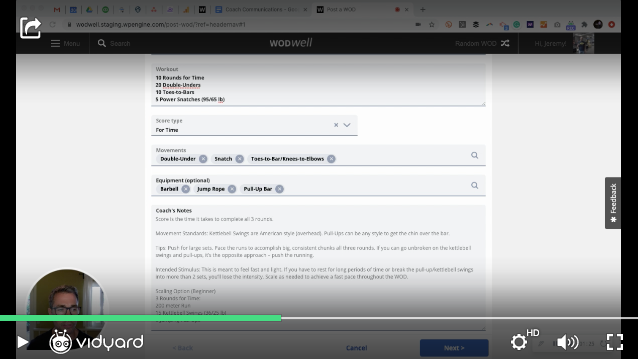
How to post a WOD (<3 minutes)
Where do I find the WODs I posted?
– You can see the WODs you post on your private user profile: wodwell.com/profile/#wods
– All users can see your WODs on your public profile: wodwell.com/coach/[your_username]
– All users can find every coach’s WODs in our public WOD list: wodwell.com/wods (in the Coach Creations category)
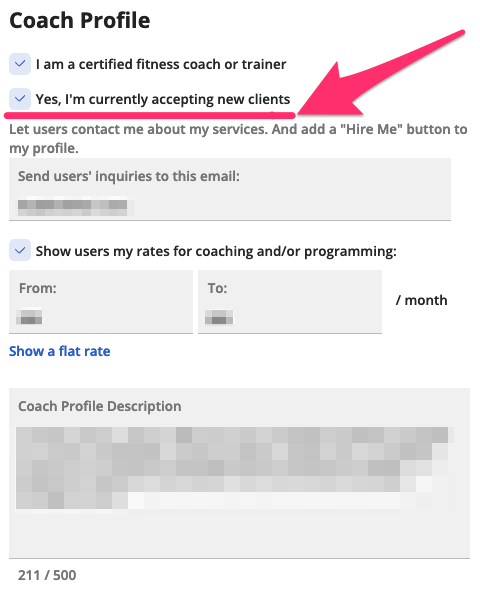
(b) You can set your profile to “accepting new clients” to receive inquiries from users about your coaching and programming services.
How do I set my profile to “Accepting new clients?”
– Log in at wodwell.com/login
– Open your profile settings at wodwell.com/profile/#settings
– Check the box “Yes, I’m currently accepting new clients”
How do you connect me with clients?
When you’re accepting new clients, it lets users find and contact you two ways:
(i) Your profile will appear to potential clients who use our “Find a Coach” feature. If you’re a fit for their needs we’ll show them your profile (including name, photo, bio/description, specialties, location, languages, and prices). If they choose to message you, will introduce you by email. (Watch:15-second animated demo).
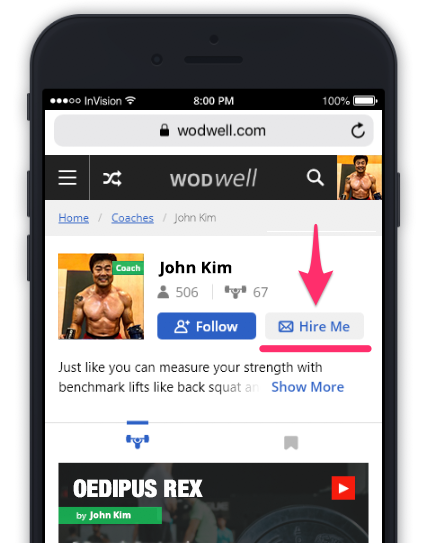
(ii) A “Hire Me” button will appear on your public Coach profile, so prospective clients can contact you directly.
How much does WODwell charge if a client hires me?
$Zero. If a client finds you on WODwell and asks to hire you, they don’t pay us for that referral, and neither do you. They pay you directly, however your other clients pay you. We don’t take a cut. Referrals are totally free for athletes and Coach members!
Why don’t we charge a fee for client inquiries? Because we believe remote coaching is an important part of the future of functional fitness and we want to connect these our members with a coach like you! We also want to help you grow your business.
4. How do I edit my Coach profile photo or bio/description?
If you already have a Coach membership, you can edit the photo and bio/description that appears on your profile. Here’s how:
- Log into your WODwell account at wodwell.com/login
- Open your profile settings at wodwell.com/profile/#settings
- Click your profile photo and choose a new picture
- Edit your bio/description and click ‘Save’
5. How do I get more followers?
Users who discover your workouts on WODwell can choose to follow you. When they follow you, they’ll see your workouts in their feed. You can see how many followers you have on your private profile (wodwell.com/profile) and your public profile (wodwell.com/coach/[your_username]).
Get more followers by regularly posting your new original WODs! Millions of people use WODwell to discover workouts. Every workout you share links directly back to your Coach profile, where people can find and follow you.